
The Egyptian government aims to increase tax revenue by expanding technology that improves governance, fairness and an accurate picture of the tax community, and that collects what the state treasury is owed. It is doing this through e-invoicing, e-receipts, a unified automated tax procedures system, electronic tax payment, electronic tax returns, and automating the work of tax appeal committees so appeals are decided faster.
Since late 2020 the Egyptian Tax Authority (ETA) has required companies to issue invoices electronically, in eight phases that ended on 15 December 2022. As the next step in this digital transformation, the ETA introduced the e-receipt system, which replaces traditional paper receipts with electronic ones.
What is an e-receipt?
An e-receipt is a digital document issued when a sale is made between a merchant or service provider and the final consumer, like the receipt you get at a restaurant, café or supermarket. The difference is that a digital copy of the receipt is linked to the ETA, even if you keep printing a paper copy for the customer.
E-receipt vs e-invoice
- E-invoice: used between two companies (B2B) or a company and a government body (B2G). Both sides have a tax file and are connected to the ETA, so if one side does not submit an invoice, the other side’s submission still proves the transaction.
- E-receipt: a simpler proof of sale, issued to final consumers who may not have a tax file. Because of the kind of businesses that issue them, e-receipts are usually connected to point-of-sale systems.
Paper receipts vs e-receipts
Issuing, handing over and storing paper receipts is manual and inefficient for taxpayers. It is costly and leads to mistakes and late payments. The e-receipt system removes paper from B2C transactions and replaces it with a faster, more efficient and more transparent process, which improves legal compliance and lowers processing costs.
The e-receipt platform
The e-receipt platform uses advanced information technology to turn manual, paper receipts into electronic copies that are faster to process and easier to keep on record, both for the taxpayer issuing them and for the ETA.
It is a natural extension of the e-invoice system, covering every type of electronic transaction (invoice or receipt). It tracks all sales of goods and services between taxpayers and consumers through electronic integration with point-of-sale devices and the taxpayer’s accounting systems.
Key features
- A standard receipt layout and content for each type of business
- Standard coding for goods and services
- Ongoing notifications and alerts
- Receipt data can be retrieved and verified with a QR code
Who takes part
- The taxpayer: sells goods and services to consumers.
- The Egyptian Tax Authority: oversees how receipts are issued.
- The consumer: receives the receipt.
Benefits
For the government
- Higher tax revenue and operational excellence
- Tax fairness and better governance of compliance
- Better tax services and easier business
- A complete economic view of all businesses
For taxpayers (merchants and service providers)
- Sales records processed digitally
- Automated, proactive procedures leading to pre-filled tax returns
- An end to arbitrary tax estimates
- Lower risk and easier compliance
- Simple, smooth communication with the ETA
In the short term, taxpayers also benefit from:
- A stronger tax position, with the company classed as low risk
- A modern way of issuing receipts
- All receipt data checked before it is issued
- Easier internal and external audits
- Support and awareness workshops run by the ETA
- Accurate reports prepared quickly and with little effort
And in the long term:
- Less administration, through lower transaction costs
- Fewer inspections, which can be done remotely
- Easier preparation and filing of tax returns
For consumers
- Consumer rights are protected
- Civic participation and commitment
- Digital receipts that protect your rights in any dispute
- Your share of state revenue is protected
Who must use e-receipts?
E-receipts mainly concern businesses that issue receipts for their sales, fast retail, and companies outside the B2B category. In short, every taxpayer who sells to final consumers must join the e-receipt system, in phases.
Companies registered for e-invoicing that also sell to consumers (B2C) must send those receipts to the e-receipt system by integrating with its APIs, while B2B transactions continue to go through the e-invoice system. If all of a company’s sales are B2C, it sends receipts to the e-receipt system only.
Phases and dates
- Pilot phase: optional. Taxpayers register on a test environment to prepare their systems before going live.
- Phase 1: mandatory from 1 July 2022 for 153 companies named by the ETA.
- Phase 2: mandatory from 1 October 2022 for 400 companies notified by the ETA.
- Sharm El-Sheikh: mandatory from 1 November 2022 for companies located in Sharm El-Sheikh.
- Phase 3: mandatory from 15 November 2022 for 2,000 companies named by the ETA.
- Phase 4: set by Decree 168 of 2023, in five sub-phases covering taxpayers in Greater Cairo and Alexandria.
- Phase 5: covering all remaining taxpayers in the rest of Egypt, from 15 July 2024, in five sub-phases.
The sub-phases of phases 4 and 5 cover the same sectors; phase 4 applies to Greater Cairo and Alexandria, and phase 5 to the other governorates.
| Sectors | Phase 4 (Cairo, Alexandria) | Phase 5 (other governorates) |
|---|---|---|
| Healthcare (medical equipment, hospitals, pharmacies), tourist and non-tourist restaurants, hotels | 15 April 2023 | 15 July 2024 |
| Transport (vehicle trading, personal transport, transport services, maintenance centres, spare parts), education (schools, universities, training centres), gold and silver | 15 July 2023 | 15 October 2024 |
| Alcohol, tobacco and conditioners; clothes, fabrics and shoes; durable appliances | 15 October 2023 | 15 January 2025 |
| Personal care centres, other personal goods, insurance services, all other services, timber, furniture, garden tools, cleaning goods and services, mobile phones and telecom centres | 15 January 2024 | 15 April 2025 |
| Grains, bread, meat, fish, poultry, dairy, fruit, vegetables, sugar and other food and drinks; cultural and entertainment activities and audio-visual equipment; gardens and parks, newspapers, books and stationery | 15 April 2024 | 15 July 2025 |
Check whether your company must join
Open the ETA inquiry page at eta.gov.eg/ar/ereceipt-inquiry and enter your tax registration number. It shows whether your company is already required to join or is waiting for its phase.
How to register
You can register through your tax office or by self-registration. Either way you will need to:
- Register an authorised person to act for the company owner, such as the accountant or another employee
- Register the ERP system you use that connects to the ETA
- Register the POS system that will issue e-receipts; it must be approved by the ETA
Documents you need
Whether you join because you are required to, or early by choice, you will be asked for:
- The company’s tax registration number
- A copy of the tax card
- The company’s email and mobile number
- The authorised person’s name in Arabic and English
- The authorised person’s email and phone number
- A copy of the authorised person’s national ID
Mandatory or voluntary registration
- Mandatory: for organisations that have received a decision from the head of the ETA requiring them to register.
- Voluntary: for companies, organisations and shops that have not yet been required to register, but choose to.
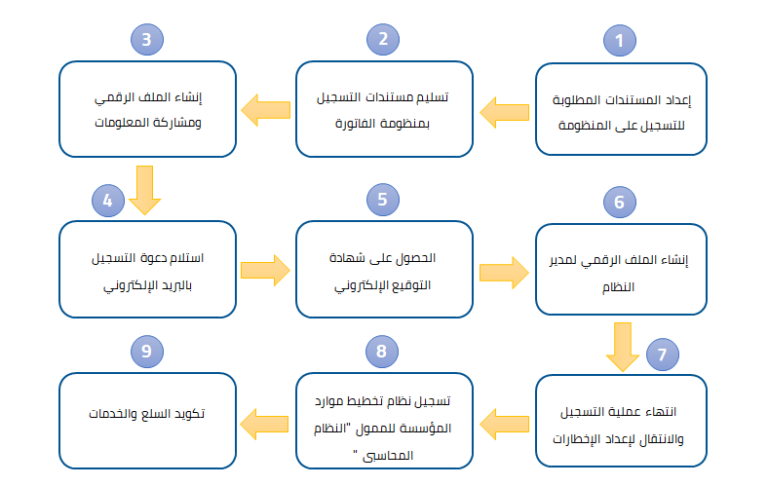
Option 1: registering through your tax office
- Submit the documents. Send a registration request with the required documents to your tax office from the company’s email. If you attend in person, bring: your valid national ID or passport (original and copy); your VAT registration certificate or tax card (original and copy); a letter from the company authorising registration, with its registration number, address, email and phone; and the details of the authorised person or system administrator (name in Arabic and English, national ID number, email and mobile). An agent must also bring the original power of attorney and a copy. If neither the taxpayer nor an agent attends, a bank-certified authorisation letter is enough. You receive confirmation once the documents are checked.
- Digital profile and awareness. The tax office collects the requests and sends them to the e-transactions department, which creates the taxpayer’s digital profile and emails an invitation to complete it.
- Accept the email invitation. The authorised person or administrator opens the link and fills in their profile: first and last name in Arabic and English, email, mobile, national ID, preferred language and password, then accepts the terms and conditions.
- Set up notifications. After signing in, open the taxpayer profile and choose your notification preferences: channel, frequency and alert types.
Option 2: self-registration
You need an electronic seal and Windows 10. You can start on the test environment and issue receipts with no real effect, then register on the live system at invoicing.eta.gov.eg.
- Taxpayer signature: enter the taxpayer number, accept the terms, choose the taxpayer signature and click Register now. Enter your PIN and sign in, then enter the certificate ID you received.
- Taxpayer details: company name in Arabic and English, default language, email and mobile.
- Verification: enter the email and mobile confirmation codes.
- Invite the administrator: enter their national ID, full name, user type and email, then click Finish and send invitation. The administrator opens the link, enters their national ID and mobile, the OTP sent to their phone and a password, then chooses the subscription type (B2B, B2C or both).
Connecting POS devices
POS devices must pass security and technical checks. The system distinguishes approved from unapproved POS: an unapproved device has to prove compliance before use and can be rejected, so choose approved POS software from the start to avoid interruptions or penalties.
If your POS supplier is approved
- Sign in to the system, go to the authorised persons section, then Points of sale, then Register point of sale.
- Enter the branch, the approved supplier and device model, a name and description, the active-from date (and active-to date if there is one) and the serial number.
- Click Register point of sale.
If your POS supplier is not approved
- Sign in or create an account, open Points of sale and choose Request a taxpayer visit.
- Enter the branch code to be visited, the person in charge and their phone, the branch address and any comment. Requests for the same taxpayer are usually combined into one visit.
- Follow your requests under Visit requests, and your devices and their status (including any rejection reason) under POS devices. A rejected device cannot issue approved receipts; link another approved device instead.
If you issue e-receipts from an ERP system, you register it once as a point of sale.
Frequently asked questions
What does an e-receipt look like?
It is very similar to an e-invoice. The differences are that an e-receipt needs no electronic signature and can carry simpler, fewer details.
How quickly must receipts be sent?
Receipts should be sent in real time. The system does not accept receipts more than 24 hours after the sale.
We have no POS, only an accounting system. How do we integrate?
Register the accounting system as a point of sale; it is treated as a software POS. That works when you have one branch or outlet. If several outlets issue receipts through one central accounting system, each outlet must be registered as a POS.
We use EGS codes that are not approved yet. What do we do?
Use the GS1 code type and put the fourth-level “GPC Code Brick” in the item code field until your EGS codes are approved.
What is E-Tax’s role?
E-Tax’s operations team runs the e-receipt system and provides the ETA with application operations, technical support for ETA staff, POS preparation, activation, support, maintenance, replacement and monitoring, and data analysis.
How do I cancel a receipt or record a return?
Issue a return receipt for the value being cancelled or returned, using the original receipt’s UUID.
Which channels can send receipts?
POS devices connected directly to the system, and ERP accounting systems connected to the system.
What is the previous UUID?
A mandatory field in return receipts: the unique ID of the last return receipt successfully issued from the same point of sale.
Can an ERP send receipts from several points of sale in one batch?
Yes, when the integration is done through the ERP.
Can receipts be issued offline?
Yes. Issuing a receipt does not need an internet connection. Receipts are stored and sent once you are connected, within the period set by the ETA (currently 24 hours).
Does an e-receipt need an electronic signature?
No.
What types of e-receipt are there?
Two so far: the sales receipt and the return receipt.
Why use Taknia Systems for e-invoices and e-receipts
- Lower cost: no extra POS devices to buy.
- Easy to use: a simple, clear interface.
- Control and security: receipts and returns are sent securely, with close oversight.
- Flexible sending: several ways to send receipts, to suit how you work.
- Works offline: keep selling without internet and send everything in one go once you are back online.
- Detailed permissions: full control over who can do what.
- Local records: every transaction is stored in a local database you can open at any time.
- Automatic backups: your data is kept safe.
- Complete reports: detailed reports on every receipt issued.
- Print or send: print receipts or send them to the customer.
- Central database: work on one central database from anywhere.